Indexing COBOL for AI agents
How GitNexus turns COBOL programs, copybooks and JCL into a graph an agent can query: why it uses a regex pipeline instead of a parser, what each stage does, what the graph looks like, and what it still cannot see.

The problem
To trace what a batch program like CUSTUPDT does, you start at the JCL step that runs it, follow the procedure flow through its paragraphs, and expand the copybooks that supply its data declarations. That information is spread across three kinds of files.
A JCL job decides which program runs and which datasets are allocated to it. The program's PROCEDURE DIVISION moves control between paragraphs with PERFORM, GO TO and plain fall-through. Many of the data names the program uses are declared in copybooks, pulled in by COPY and sometimes renamed on the way in by REPLACING.
Grep finds where a name appears. It does not tell the agent that WS-NAME in a program is PREFIX-NAME in a copybook, or that STEP1 in a job runs the program it is reading. That is the structure GitNexus indexes. This post walks through how, using the code in the GitNexus repository at commit 50228e1.
Why not tree-sitter
Almost every language in GitNexus is parsed with tree-sitter. COBOL is not. Its language provider is declared with parseStrategy: 'standalone', which tells the tree-sitter phase to skip .cbl, .cob, .cobol, .cpy and .copybook files and leave them to a dedicated processor.
The reasons are written down in a design note at the top of cobol-preprocessor.ts:
- Speed. The note estimates about 1 ms per file for regex extraction against 50 to 200 ms per file for ANTLR4 or tree-sitter. On a 14,000-file COBOL codebase that is roughly 14 seconds against 12 to 47 minutes.
- Reliability. The external scanner in
tree-sitter-cobol@0.0.1hangs on about 5% of the production files the maintainers tested, with no way to time it out. The most complete ANTLR grammar is a Java project. - Dialects. Real code includes GnuCOBOL with Italian comments, patch markers in columns 1 to 6, and vendor extensions that formal COBOL-85 grammars reject.
Those figures are the maintainers' own measurements, recorded in a code comment, and we have not reproduced them here. The extractor builds no syntax tree. What it finds depends on which source formats and statement forms its patterns recognize, which is why the limitations section at the end matters.
Reading fixed-format source
Most production COBOL is fixed format, so position on the line matters. preprocessCobolSource blanks any non-space content in columns 1 to 6 and keeps the line count unchanged, so positions still map back to the file. A sequence number like 000510 or a patch marker like mzADD never reaches the extractor as an identifier.
The extractor then runs as a single-pass state machine:
- Column 7 is the indicator.
*or/makes the line a comment and it is dropped.-makes it a continuation, merged into the previous logical line, including the rules for continuing a quoted literal. - In fixed format, a paragraph header is only accepted if it starts in column 8, the first column of Area A. The standard allows a header anywhere in columns 8 to 11; GitNexus is stricter, to avoid mistaking indented data names or
CALL USINGoperands for paragraphs. - If
>>SOURCE FORMAT FREEappears in the first ten lines, the file is treated as free format:*>starts a comment and each physical line is a logical line. EXEC SQL,EXEC CICSandEXEC DLIblocks are accumulated up toEND-EXEC. From SQL it pullsINCLUDEmembers, table names afterFROM,INSERT INTO,UPDATEandJOIN, and cursor declarations.
The pipeline
- .cbl .cob .cobol
- .cpy .copybook (copybooks)
- .jcl .job .proc (JCL)
- skipped by the tree-sitter phase
- blank columns 1–6 (sequence area)
- free-format files left as is
- line count preserved
- REPLACING: pseudotext, LEADING, TRAILING
- depth ≤ 10, ≤ 500 expansions
- cycles skipped with a warning
- unresolved COPY left in place
- single-pass regex state machine
- col 7: * / comment, - continuation
- PROGRAM-ID, sections, paragraphs, data items
- PERFORM, CALL, MOVE, EXEC SQL/CICS/DLI
- Module · Namespace · Function
- Property · Record · CodeElement
- CALLS · CONTAINS · IMPORTS · ACCESSES
- 2nd pass resolves cross-program CALL
- JOB → steps (CONTAINS)
- EXEC PGM= → indexed program (CALLS)
- DD DSN= → dataset allocation (CALLS)
- no new node types
The COBOL phase runs after GitNexus has scanned the repository's file structure and before tree-sitter parsing. It sorts files into programs, copybooks and JCL, blanks the sequence area, expands copybooks into each program, extracts symbols from the expanded source, writes them to the graph, and then processes JCL. Programs larger than 5 MB are skipped with a warning; GITNEXUS_MAX_COBOL_FILE_SIZE_BYTES changes the limit.
Copybook expansion
COPY is a textual include, so GitNexus expands it before extraction rather than treating it as an import to resolve later. The expander handles quoted and unquoted targets and REPLACING with pseudotext, LEADING and TRAILING.
One difference from a compiler is worth knowing. GitNexus applies pseudotext such as ==PREFIX-== BY ==WS-== as a plain substring replacement, so it also rewrites PREFIX-NAME to WS-NAME. A standard compiler matches pseudotext against whole text words and would leave PREFIX-NAME alone; to rename prefixes you would write REPLACING LEADING ==PREFIX-== BY ==WS-==. The fixture below relies on GitNexus's behavior.
The resolver matches the COPY target against upper-cased file names without extensions, preferring .cpy and .copybook files over programs. If any matching file sits under a directory named copybooks, COPYBOOKS, cpy or copy, only files in those directories or next to the including program are considered. Before that rule, a COPY could resolve to a same-named file in vendored code.
Expansion stops at 10 nesting levels or 500 expansions per program. A copybook that includes itself, directly or through another, is skipped with a warning. A COPY that cannot be resolved is left in place, and no edge is written for it.
What becomes what
| COBOL | Graph node | Main edges |
|---|---|---|
PROGRAM-ID | Module | File CONTAINS Module |
SECTION | Namespace | Module CONTAINS Namespace |
| Paragraph | Function | CONTAINS from its section, or from the program |
| Data item (levels 01 to 49, 66, 77, 88) | Property | ACCESSES from paragraphs that read or write it |
SELECT ... ASSIGN | Record | target of DECLARATIVES error handlers |
ENTRY 'X' | Constructor | target for CALL 'X' |
PERFORM, PERFORM THRU, GO TO | CALLS between paragraphs | |
CALL 'PROG' | CALLS between programs | |
CALL ws-variable | CodeElement | kept as a dynamic-call marker |
COPY member | File IMPORTS File |
Only four relationship types are used: CALLS, CONTAINS, IMPORTS and ACCESSES. The COBOL meaning goes in each edge's reason, such as cobol-perform, cobol-perform-thru, cobol-goto, cobol-move-read or sql-select. An agent can filter on those, and the rest of GitNexus needs no COBOL-specific tables.
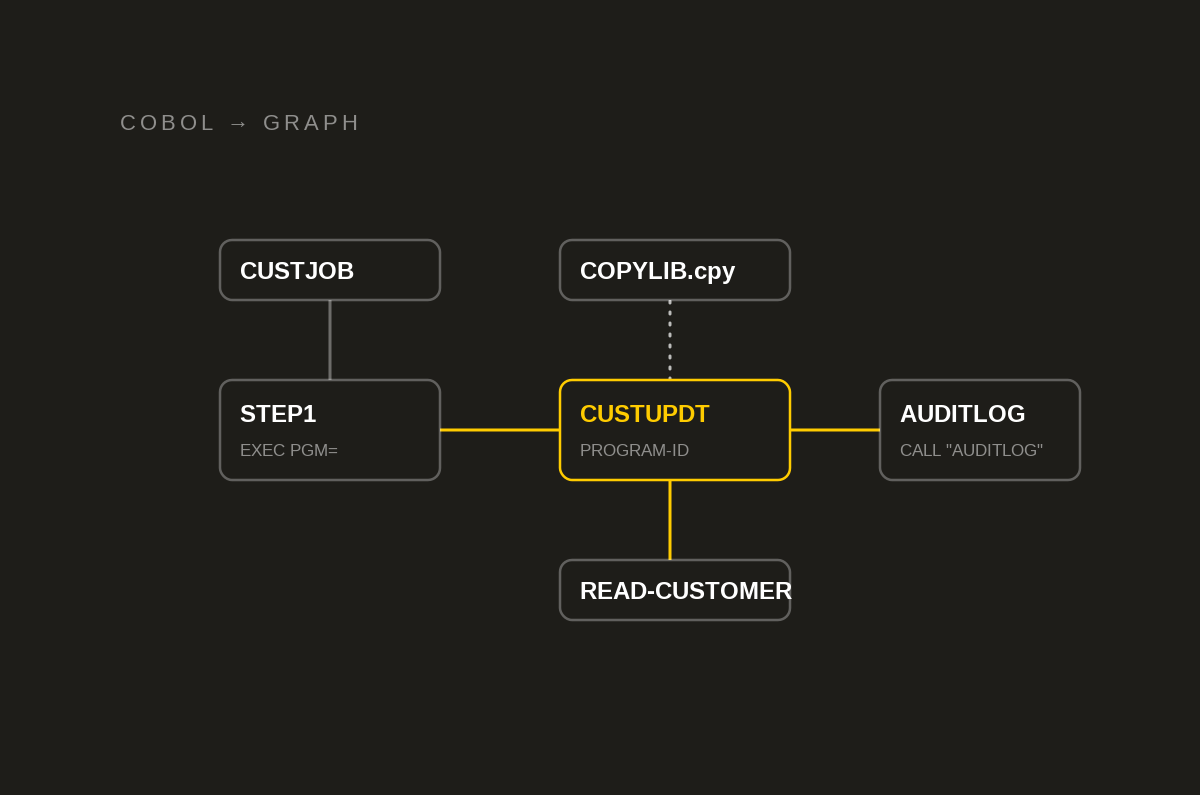
Cross-program calls need a second pass. When CUSTUPDT calls "AUDITLOG" before AUDITLOG.cbl has been processed, the edge first points at an unresolved placeholder. After every program is registered, GitNexus rewrites each one whose target it can now find, either a program or an ENTRY point, and removes the placeholders.
JCL
JCL is parsed line by line with three main patterns: //name JOB, //name EXEC and //name DD. A job becomes a node that contains its steps. A step with EXEC PGM=CUSTUPDT gets a CALLS edge to the CUSTUPDT program, if that program was indexed. A DD DSN=... statement becomes a dataset node with a CALLS edge from the step, and the edge reason records the DD name. That edge says the step allocates the dataset. It does not say whether the program reads or writes it, and GitNexus does not join the DD name to the program's SELECT ... ASSIGN clause. In-stream procedures are indexed, and INCLUDE MEMBER= adds an edge when the member is a known module, without expanding it. JCL reuses the existing node types instead of adding new ones.
A worked example
GitNexus's test suite includes a small application under test/fixtures/lang-resolution/cobol-app/. It is an indexing fixture, written to exercise the extractor rather than to run on a mainframe. Here are three of its files.
The job:
//CUSTJOB  JOB (ACCT),'CUSTOMER UPDATE',CLASS=A,MSGCLASS=X
//STEP1    EXEC PGM=CUSTUPDT
//CUSTFILE DD DSN=PROD.CUSTOMER.MASTER,DISP=SHR
//STEP2    EXEC PGM=RPTGEN
//SYSOUT   DD SYSOUT=*
The copybook COPYLIB.cpy:
       01 PREFIX-RECORD.
           05 PREFIX-CODE           PIC X(10).
           05 PREFIX-NAME           PIC X(30).
And part of CUSTUPDT.cbl:
           COPY COPYLIB REPLACING ==PREFIX-== BY ==WS-==.
      ...
       PROCESSING-SECTION SECTION.
       PROCESS-PARAGRAPH.
           PERFORM READ-CUSTOMER THRU WRITE-CUSTOMER
           CALL "AUDITLOG" USING CUST-ID WS-AMOUNT
           CALL WS-PROG-NAME.

       READ-CUSTOMER.
           READ CUSTOMER-FILE
               NOT AT END
                   MOVE CUST-NAME TO WS-CUSTOMER-NAME
           END-READ.
The integration test for this fixture checks the graph exactly. A few of its assertions:
COPY COPYLIB REPLACING ==PREFIX-== BY ==WS-==produces data itemsWS-RECORD,WS-CODEandWS-NAME. The names in the graph are the ones the program actually uses, not the copybook's.PERFORM READ-CUSTOMER THRU WRITE-CUSTOMERproduces two edges:cobol-performtoREAD-CUSTOMERandcobol-perform-thruto the range's end,WRITE-CUSTOMER.UPDATE-BALANCE, which sits between them in the source, runs as part of the range but gets no edge from thePERFORM.CALL "AUDITLOG"becomes acobol-calledge between the two programs.CALL WS-PROG-NAMEcannot be resolved, so it is recorded as a dynamic-call node insideCUSTUPDTinstead of a guessed edge.MOVE CUST-NAME TO WS-CUSTOMER-NAMEbecomes a read edge to one data item and a write edge to the other.STEP1getsjcl-exec-pgmtoCUSTUPDTandjcl-dd:CUSTFILEtoPROD.CUSTOMER.MASTER.- No
CALLSedge in the finished graph still has an-unresolvedreason.
Across the whole fixture, the test expects 5 programs, 21 paragraphs, 36 data items, 31 CALLS, 81 CONTAINS, 2 IMPORTS and 28 ACCESSES edges.
What an agent can do with it
COBOL symbols go through the same MCP tools as every other language. There is no COBOL-specific tool.
- Impact. By default
impactfollowsCALLSandIMPORTS, notCONTAINS. On a program, that finds the programs that call it and the JCL steps that run it. On a paragraph, it finds the paragraphs thatPERFORMorGO TOit; to get from a paragraph to the jobs, start again from its program.impactdoes not followACCESSESby default either. To ask which paragraphs read or write a data item, passrelationTypesthat includeACCESSESto bring in theMOVE, arithmetic andCALL USINGedges. - Rename. The COBOL rename provider is deliberately conservative. In the test case that renames program
WORKERtoSERVICE, it changesPROGRAM-ID,END PROGRAMand the literal inCALL "worker", and leavesDISPLAY "WORKER"alone: three edits. It refuses when it reaches a case it cannot handle safely: for example, when any dynamicCALLexists that might name the program, when an occurrence sits insideEXEC ... END-EXEC, or when an edit in fixed format would push text past column 72. The provider works on COBOL source, so check the JCL that runs the program separately. - Control flow. With
--pdg, GitNexus builds a control-flow graph per program. A program, not a paragraph, owns the flow, because execution falls through paragraph boundaries andPERFORMreturns at the end of its range. Nested programs keep separate owners, so impact on an outer program does not leak into an inner one.
What it does not see yet
COBOL support is marked experimental in GitNexus's own language classification. These are the gaps the code and tests document:
- Dynamic calls.
CALL ws-variableis recorded but not resolved. The target is decided at run time. - Missing copybooks. An unresolved
COPYis left unexpanded with no edge, so fields from that copybook are missing from the graph. The pipeline does not raise an error, so a repository missing a copybook library will index with gaps. - Line numbers after expansion. Line numbers come from the expanded source, so after a
COPYthey no longer match the raw file exactly. - Qualified names.
MOVE X OF YresolvesXby name, using the first match, not by its qualified path. - Control-flow limits. The control-flow builder refuses programs that use
ALTER,GO TO ... DEPENDING ON,SEARCH, embedded SQL, recursivePERFORMorREDEFINESaliases. Those programs still get the regular graph, just not a control-flow graph. - Cross-program data flow. Data-flow edges stop at program boundaries.
CALL ... USINGrecords which fields are passed, but GitNexus does not trace a value through the called program.
Numbers
When COBOL support shipped in v1.4.9, the changelog recorded two runs on public COBOL codebases: CardDemo at 12,349 nodes and 9,773 edges in 7.4 seconds, and ACAS at 14,017 nodes and 15,659 edges in 9.3 seconds. The project also has a scaling test over 100 to 1,000 generated programs. It fails if indexing time grows more than four times faster than the file count, or node count more than 1.3 times faster. It only runs on request, so its timings are not published in the repository.
Try it
Indexing runs locally. Your coding agent, and any remote features you configure, have their own data paths.
npx gitnexus analyze
npx gitnexus setup
Point it at a repository with .cbl, .cpy and .jcl files. Then try upstream impact on a program to find its callers and the JCL steps that run it, or on a paragraph to find what performs it.
If your COBOL can't leave your network, book a 30 minute walkthrough and we will show you a self-hosted or air-gapped setup on your own code.
Keep reading